

GuideToDocs: Generate user manual templates with auto-screenshots. Create perfect step-by-step instructions & how-to guides in Docs!
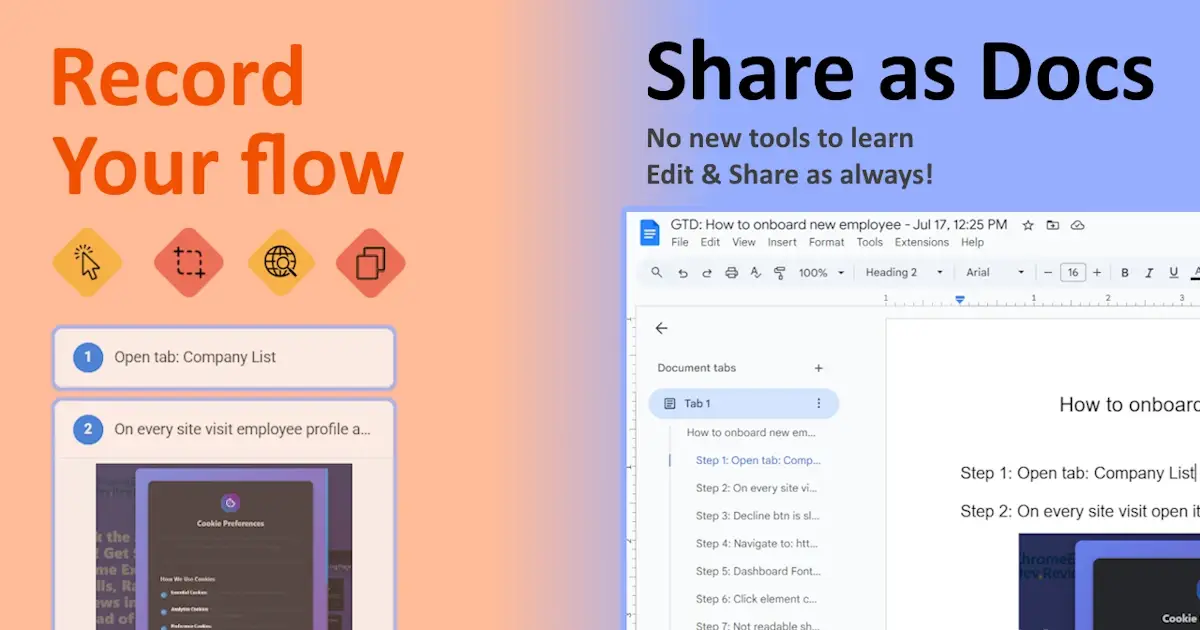
Tired of manually documenting processes? GuideToDocs is the ultimate Chrome extension that records your screen actions and instantly generates professional user guides — complete with screenshots and step-by-step instructions. Perfect for IT teams, educators, HR, and content creators!
✨ Key Features
✔ One-Click Recording – Start/stop with Alt\Command+R (can be changed in options).
✔ Professional Export Options – Google Docs, PDF with custom fonts, and Word documents
✔ Beautiful Screenshot Styling – Add elegant gradients, shadows, and rounded corners to screenshots
✔ One-Click Rich HTML Copy - Preserves all formatting, images, and styling when pasting
✔ Auto-Screenshots – Captures every click, text input & navigation.
✔ Screenshot Area Selection – Select important page area by holding Ctrl + Drag (configurable).
✔ Session Management – Save, resume, or edit recordings anytime.
✔ Light/Dark Themes – Customize for comfortable use.
🔋 The Hidden Step-by-Step Tutorial Struggle - manual guides fail by missing critical interactions (dropdowns, shortcuts) and become outdated instantly, wasting hours reformatting Google Docs screenshots.
✨ GuideToDocs solves this by auto-capturing every action into version-controlled, editable Google Docs with timestamped screenshots - transforming hours into minutes!
📌 How to Create a Study Guide in 3 Steps
1. Record Your Research - Press Alt\Command+R to start recording, navigate through educational resources while GuideToDocs captures.
2. Organize the Flow - Use the drag-and-drop editor to reorder steps logically, delete unnecessary sections, edit annotations to screenshots.
3. Export & Share - Click "Export to Docs" for an instant formatted study guide or Copy to Clipboard. Shareable result link with classmates!